What Customer Agent makes possible
As a reminder, Customer Agent is your 24/7, AI-powered digital assistant. It answers questions, recommends products, resolves issues, and converts customers quickly and easily across web chat, text message, email, WhatsApp, and more.
More specifically, it helps you:
- Resolve high volumes of support automatically.
- Enter conversations with the complete customer picture.
- Turn service into a revenue channel.
- Work across many channels (email, web chat, WhatsApp, text).
- Go live in days, not months.
- Empower your team to stay in control.
- Automate operational workflows.
No more manually handling repetitive inquiries, no more limited team coverage, and no more disjointed data. It’s a powerhouse tool that knows your brand inside and out, and transforms the service experience for your customers.
Refine Customer Agent knowledge
A strong Customer Agent starts with strong inputs. The quality of its answers depends on the quality of the information it can access, so accurate and well-maintained content is essential. As your business evolves, continue refining these inputs over time.
Click the tabs below to explore how storefront and content sources shape your Customer Agent’s answers.
Storefront
Customer Agent ingests knowledge directly from your storefront. That means it indexes your homepage, individual product pages, FAQs, and all other content it can find.
Upon setup of Customer Agent, Klavio automatically scrapes your storefront. To set it up:
- Head to Customer Agent > Content > Add new > Webpages.
- Check the box for Turn on auto-syncing. When Customer Agent detects changes across your storefront, it will pull in and update content accordingly.
- Select “Import all pages from this URL” if you want Customer Agent to pull from all subpages within your main homepage, capturing all relevant details on individual collection or product pages.
Learn more about how to automatically sync website content for Customer Agent.
The automatic scraping of your storefront already provides your Agent with a ton of valuable content, before you even add anything else manually. Review what you’ve already got covered before adding new content sources. Using Composer to preview your Agent is a great way to spot these content gaps.
Additional knowledge
In addition to your storefront, you can choose to manually add new knowledge sources to provide your Agent with more context, detail, or specific answers to common questions.
You can upload content in the format of files, text, snippets, or webpages. Common content sources you may upload include:
- FAQs (not listed on your website)
- Specific policies
- Product specs
- Training materials
Again, using Composer to preview your Agent is a great way to spot any knowledge gaps you may have. When you upload new knowledge, test your agent to make sure it helps answer the questions you’d expect. If it doesn’t, you may need to refine it or add new supplemental knowledge.
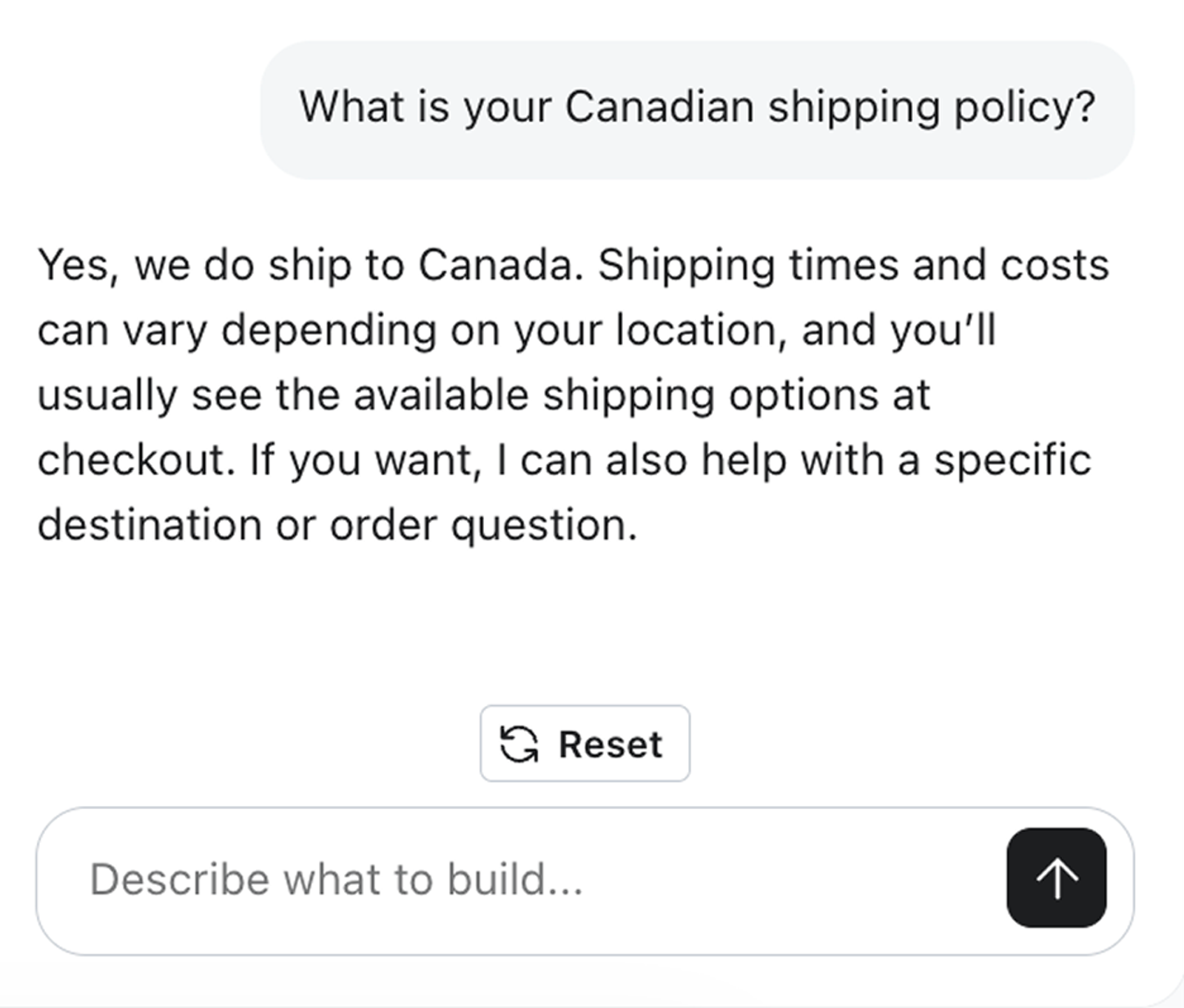
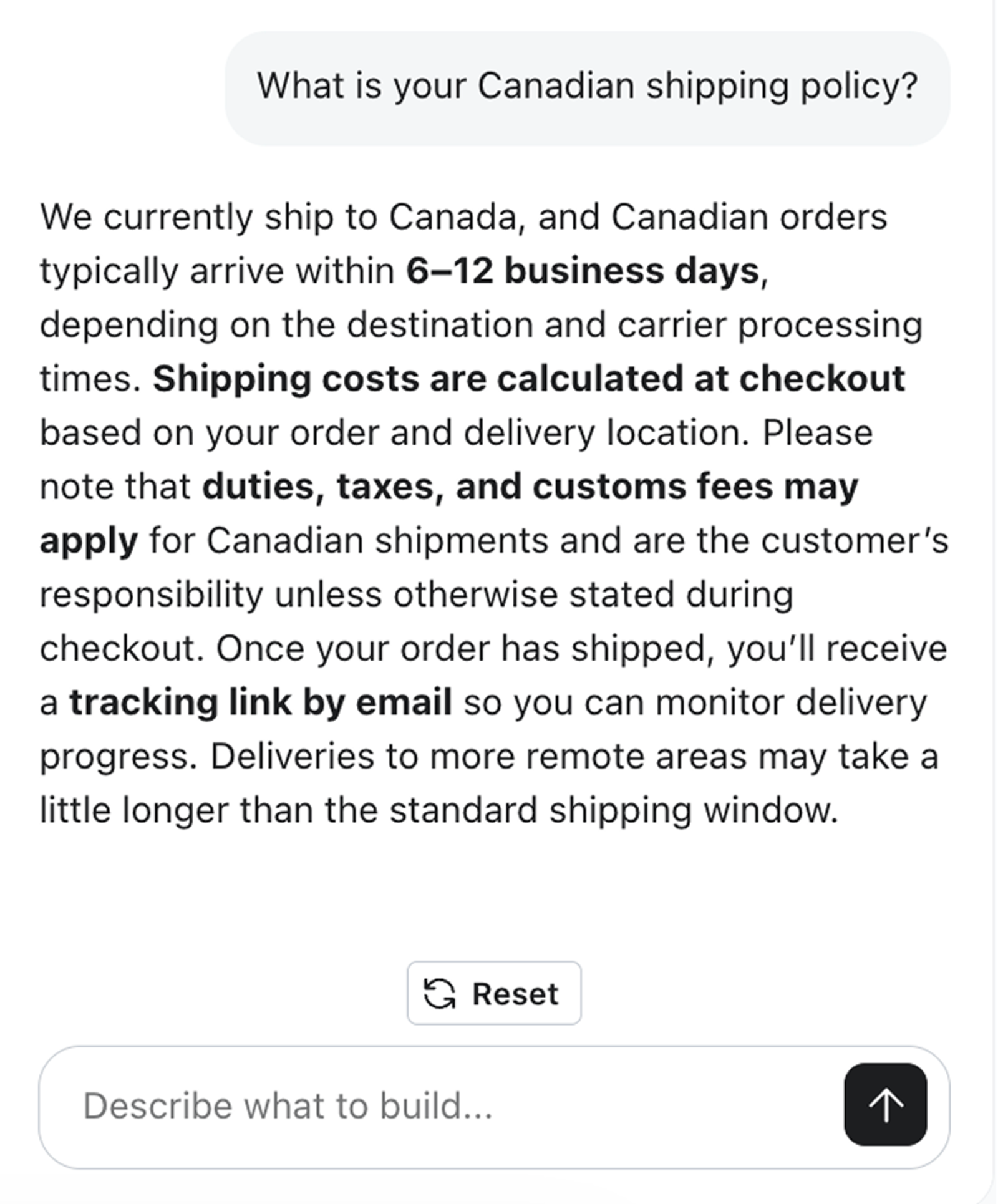
Compare Customer Agent responses
To see the importance of knowledge in action, let’s compare 2 different Customer Agent responses to the same question. One of these scenarios represents a knowledge gap, while the other represents a strong knowledge foundation.
Best practices for writing strong Customer Agent knowledge
Expand the dropdowns below to learn some best practices for writing strong Customer Agent content that translates into thorough, accurate customer conversations.
Use clear, plain language
Customer Agent pulls from the type of words and phrasing you use - so minimize the jargon, and keep it simple.
In a support conversation, a customer is looking for straightforward answers; your content should mirror that.
Keep knowledge factual, not promotional
Marketing-specific tone and phrasing can be configured in the Guidance section, which we’ll cover later in this course. Knowledge should be focused on factual information only.
Restate the question in answers
This practice can help Customer Agent better identify the knowledge it should pull from when certain questions are surfaced in conversations.
Use bullets and lists for processes
Using structure when documenting processes (such as bullet or list format) helps Customer Agent understand the flow or hierarchy of how a set of tasks or items progress.
Lead with the answer, add detail after
Don’t bury the answer within the details; make sure it’s clear and front and center. This will help Customer Agent find and surface the correct answers quickly in conversations.
Remove conflicting information
Having conflicting information across your knowledge could lead to Customer Agent surfacing old information, incorrect information, or confusing information. If you notice any of these issues occurring during preview, do an audit of your knowledge and be sure to remove conflicting sources.
Preview and test frequently
When adding and refining content, it’s crucial to preview and test your agent frequently with Composer. Pretend you’re a customer and ask questions you’d expect the Customer Agent to know, based on the knowledge it has. Document any errors to help you identify what content adjustments you need to make.