Translate the custom segmentation formula into a Klaviyo segment
In the previous lessons, you learned the custom segmentation formula (consent + engagement + behavior or property) and how to match your business goal to the right customer behaviors. Now it's time to put it all together in Klaviyo.
Every segment that you plan to send marketing messages to needs consent AND engagement. Consent and engagement are always connected with AND logic, meaning a profile must meet both criteria to qualify. From there, at least one behavior/property must also use AND. Then, choose whether the remaining conditions need to meet all criteria (AND) or just one (OR).
Let's walk through how each component translates into the segment builder. The labeled graphic below shows how the custom segmentation formula maps to conditions in the Klaviyo segment builder. Click on the hotspots to expand the different components and learn how to set them up in Klaviyo.
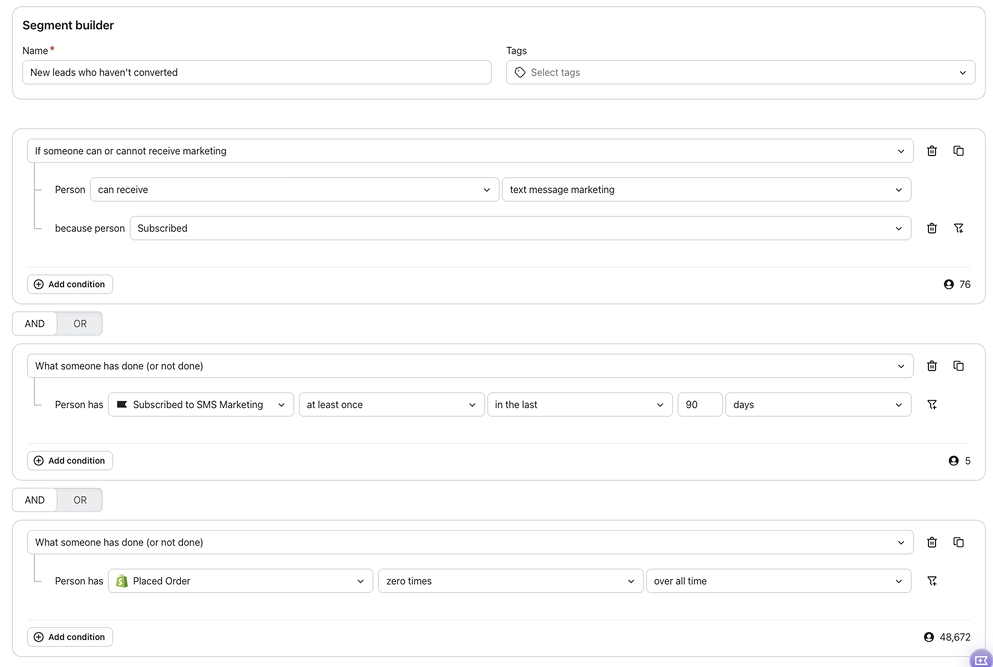
The consent and engagement components will look similar across most of your custom segments. The behavior/property component is where each segment becomes unique to your goal.
See the formula in action
Looking for inspiration? Browse the gallery below to see how Eastie, the brand we met in the first lesson of this course, applies this formula to their business goals. Each example shows a different goal, the customer behaviors linked to it, and how the custom segment comes together in practice.
Increase sales for their performance running shoe line
One of Eastie’s goals is to increase sales for the Meridian running shoe line, which represents one of Eastie's higher-priced product categories at over $100.
- Goal: Increase sales for the Meridian running shoe line.
- Linked behavior: Browsed or purchased similar products above $100.
- Custom segment:
- Consent: Person can receive email marketing because they subscribed.
- Engagement: Opened email at least once in the last 60 days.
- Behavior/property: Viewed product where price is greater than $100 OR placed order where item price is greater than $100.
This segment targets engaged contacts who have already shown interest in Eastie’s higher-value products, making them the more likely audience to convert on the Meridian shoe line.
Drive traffic to physical stores during off-peak hours
Eastie has both an online store and physical locations. Their goal is to drive more foot traffic to their brick and mortar stores during off-peak hours.
- Goal: Drive traffic to physical stores during off-peak hours.
- Linked behavior: Is within a specific geographic radius of a store.
- Custom segment:
- Consent: Person can receive text marketing because they subscribed.
- Engagement: Clicked SMS at least once in the last 60 days.
- Behavior/property: Person is within 3 miles of a given zip code of their store locations.
This segment targets engaged contacts who are located near an Eastie location, making them more likely to respond to a campaign promoting in-store offers.
Reduce subscription churn
In addition to footwear, Eastie offers a subscription package that delivers running socks to customers on a recurring schedule. Their goal is to reduce churn by re-engaging customers who recently canceled their subscription.
- Goal: Reduce subscription churn.
- Linked behavior: Recently cancelled subscription.
- Custom segment:
- Consent: Person can receive email marketing because they subscribed.
- Engagement: Opened or clicked email at least once in the last 30 days.
- Behavior/property: Cancelled subscription at least once in the last 30 days.
This segment targets recently cancelled subscribers who are still engaging with Eastie’s emails, giving the brand a window to reach them before they disengage entirely.
These are just a few examples of how the formula can come together. There are many ways to approach a business goal, and many possible custom segments you could build. Use these as inspiration, but don't be afraid to experiment with different combinations of behaviors and properties that fit your unique strategy.
Not sure which conditions to use? Try Klaviyo's “Define with AI” feature. Describe the audience you want to reach in plain language, and it generates the matching segment conditions for you to review and adjust.