Create a visual roadmap for your content
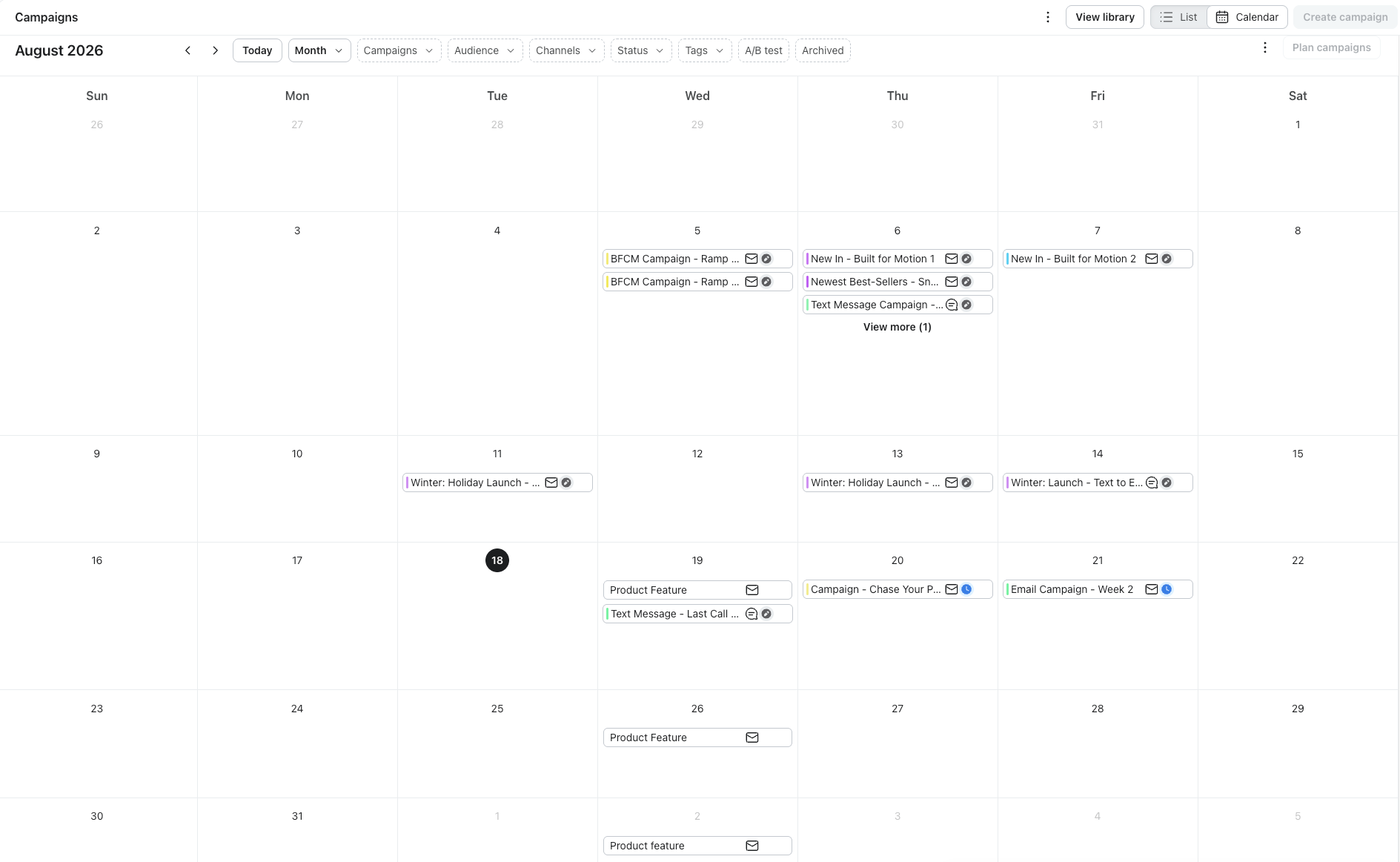
Use the Klaviyo campaign calendar to streamline your campaign content creation and improve your overall marketing strategy. In the video below, you’ll learn two ways to visualize your campaigns and identify key tools that help you filter, sort, and analyze your campaigns.
Focus on what is ahead
When planning your calendar, start by looking at the full year to visualize the bigger picture. This approach helps you identify areas where you can prepare ahead of time and highlight potential overlaps, gaps, or opportunities for campaigns.
From there, shift your focus from the full year to one month. Take a look below to see how Eastie plans its campaigns around key holidays for that stretch, while still allowing room for flexibility. Click on each point to take a deeper dive into specific strategies.
Use key dates to your advantage
Identify important dates beyond traditional holidays by considering audience-specific events, predictable customer behaviors, and regional holidays.
Regularly review past campaign performances to fine-tune your calendar and make informed decisions on timing and messaging. This combined approach ensures campaigns resonate with customers by aligning with their calendars, cultures, and behaviors throughout the year.
- Key dates: Select holiday calendars for specific countries based on their customer locations, such as the US, France, and Australia.
- Events: Include local festivals, industry-specific events (like National Coffee Day), and cultural observances relevant to international markets.
- Previous data: Analyze historical data to pinpoint peak buying seasons, slower periods, and seasonal shifts in customer preferences.
Add placeholder campaigns
Next, add placeholder campaigns according to holidays. A placeholder refers to a temporary campaign that you add to your calendar until you are ready to replace it with real content.
Strategies for placeholder campaigns:
Placeholder campaigns should reflect your content pillars and align with your overall marketing goals. Add placeholder campaigns for:
- Promotions, limited sales, or product launches around important holidays.
- Newsletters during months with few to no important holidays.
- Additional brand-specific holidays, like National Coffee Day for coffee brands.
Additionally, keep your calendar flexible. Things can shift at your company or around the world that are out of your control, forcing you to make adjustments.
Tip: Use tags to organize your campaigns by content pillars, location, and more.
Establish a consistent sending pattern to maintain strong deliverability
Similar to Eastie, once you pencil in the campaigns you want to focus on for the next month or quarter, you can get even more specific and consider the optimal time to reach your audience.
These action steps will guide you in identifying the ideal sending cadence for your brand.
Customers enjoy getting engaging newsletters and enticing offers, but too many messages can turn them off and reduce future engagement. To avoid subscriber burnout, finding a perfect sending cadence is key. Let's look at a few best practices for a sending strategy that scales with your business.
- Consider your team’s capacity to determine a realistic campaign send for each week or month.
- Use your channels strategically for each campaign based on your target audience.
- Stay consistent each week or month with your campaign send and only increase gradually, if needed.
- Create flexibility per quarter in case you need to adjust your calendar to meet business goals better.
After establishing a sending cadence for your content, decide on the days of the week to send your messages. We do not recommend sending campaigns daily to the same customers. This leads to fatigue and subscribers may stop engaging altogether. That said, there are some days of the week that work best for certain campaigns:
- Monday to Wednesday: Early in the week, subscribers are getting back to work and are ready to learn. These days are ideal for an informative newsletter. Additionally, you can give customers a heads up on a new product launch.
- Thursday to Sunday: The second half of the week is when subscribers are usually heading out in town with loved ones, shopping online, or hearing about great promotions from their friends. These days are perfect for sending promotional offers or reminding customers about a new product launch.
While you can play it by ear and pick a day to send your campaign at random, you can also test your options to see if sending on a particular day will impact your engagement through A/B Testing.
Start by testing which day of the week works best for your audience. Determine which days you’d like to test. Keep in mind: new subscribers will not be included in this test, as the campaign recipients will be determined when you schedule your message.
After you run this test, evaluate your engagement rates (open, click, and conversion) to determine if 1 particular day of the week performs better than another.
This leads to these crucial questions: where do I start? What is the quickest way to audit my previous campaigns? When is the ideal time to hit send?
If you’re unsure where to start or get stuck somewhere in your campaign, prompt Composer to help. Composer will tap into your data to assist you in:
- Creating your campaigns
- Identifying gaps in your messaging schedule
- Revising existing campaigns
Learn more about getting started with Composer here.