Omnichannel campaign builder analytics
Once your campaign is live, use built-in analytics to monitor performance across messages, channels, and time. In the labeled graphic below, select each label to explore how the various parts of the omnichannel campaign builder work together and where to find key performance insights.
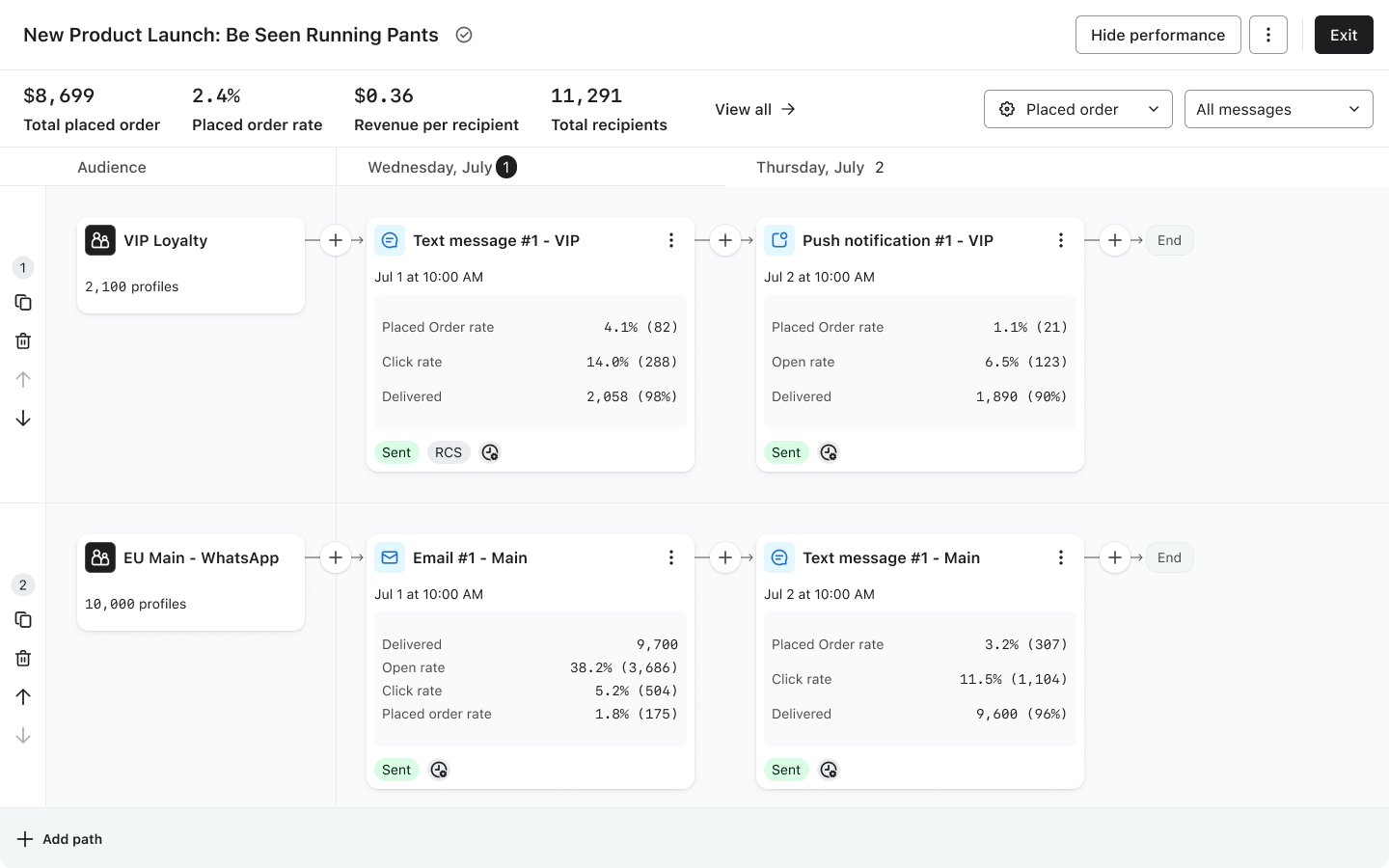
Update your strategy to improve your next campaign
After sending an omnichannel campaign, keep a close eye on its performance throughout its sending timeline. To do so, head to your omnichannel campaign and click Show performance to expand insights for each message in your campaign.
Use this data to make strategic adjustments in your next campaign. Expand the dropdowns below to review examples of best practices and improve your campaigns based on common outcomes.
High unsubscribe rates from a particular channel
This is a sign that recipients are facing message fatigue, meaning they’re overwhelmed by either excessive, repetitive, or poorly timed and irrelevant communications.
Cut back on either the length of your message paths or the use of too many messages via the same channel for a single topic.
For instance, if you see a spike in unsubscribes after texting an audience twice in one path, then remove the second text in your next campaign. Instead, swap the second text with an email, or opt to re-target these subscribers via ads on social media.
Increased revenue attributed to a specific path
If you see significant revenue attributed to a channel within a particular timeframe (e.g., push notifications drove 40% of sales on Day 2 morning), then take note of which segments resonated with this content, channel types, and message frequency.
More specifically, you can duplicate this path for future use. Swap out the content with fresh material when you are ready to plan and schedule, but keep the channels and cadence the same.
For example, if the initially successful path was the launch of your winter sale items, you may duplicate this path and prepare new, exciting content for spring. Change the promotions, copy, and CTAs of your content, but keep the overarching sending strategy in place.
Low performance for certain pathways
This indicates that you must change either the audience you’re targeting, the content you show them, or when you show it to them.
First off, adjust the inclusion and/or exclusion criteria for key segments, or create new, more granular segments based on engagement metrics. Beyond that, take a closer look at where and how the audience is engaging within your path to adjust future campaigns.
Let’s say your “window shoppers” segment (e.g., those who browsed your site but never bought) has a low open rate and high unsubscribe rate for an email that sends on Day 2 of the promotion, but a subset of that group clicks through a “Final Sale” email on Day 5.
In your next campaign to this group, remove content in between the initial sale launch and final sale alert. Beyond that, you could hone in on a more detailed segment that targets those window shoppers who opened your campaign last time, but still didn’t convert with one final, even more enticing deal to convert this time, for one day only, to get them to act fast.
High click rate, low conversions
This can signal a few things:
- The audience is interested in the deal, but needs another push to buy.
- Your CTA in the message is not accurately reflecting what audiences see on the page.
- A broken customer experience between the marketing message they click and what they experience on-site (e.g., a linking issue, 404 errors, etc.).
First and foremost, investigate the second issue. Test your message content and confirm: is your CTA leading to the right landing page, does the promotional copy adequately describe where you are taking them, and are there any issues on your landing page that are halting someone from converting (e.g., excessive steps to purchase or a slow loading time)?
Once you confirm that the shopping process is optimized, it’s time to revise your message path. Perhaps someone was distracted or not yet ready to buy after clicking your link. Follow up with the next best message in future iterations of this campaign. Perhaps send:
- A time-sensitive or “last chance while supplies last” email to email subscribers.
- A direct message via mobile-centric channels (text, WhatsApp, or push) to those subscribers with a clear and compelling reason to buy now (an even better deal or perhaps a push to shop within the next hour to access savings).
If you struggle to determine what CTAs are most compelling for your audience, then run an A/B test. For example, you may experiment with 2 unique offers in the same campaign: "15% off" vs. "$10 off" to test if value perception is a barrier to purchase.
Increased revenue per channel at a specific day or time in the campaign
In some cases, you may find that specific points in your campaign timeline drive higher revenue for a certain channel. Use this data to determine when to send this message type in future multi-day campaigns.
For instance, your omnichannel campaign may include several text messages over the course of 1 week. You find that the text sent on the final day of your promotion leads to the highest revenue, but earlier texts fail to yield that kind of engagement.
You may determine that text is best saved for last-chance reminders rather than promotion launches, swapping lower cost messages like email and push for those early day reminders.
In summary, revise your engagement strategy based on trends over time to optimize engagement pathways and your overall return on investment for each campaign.