Scalable growth starts with reporting
Great hotel marketing does more than drive opens and clicks. Without performance reporting, you can miss which campaigns drive direct bookings, which guests are ready to upgrade, and where revenue is slipping away. Use Klaviyo’s built-in hotel reporting to turn those signals into smarter decisions, stronger campaigns, and more valuable guest stays.
Explore integration dashboards
Once you integrate your PMS system with Klaviyo, you’ll unlock crucial data about your guests with dashboards. Click between the gallery tabs below to explore the types of dashboards you might have access to, depending on your PMS integration.
Description
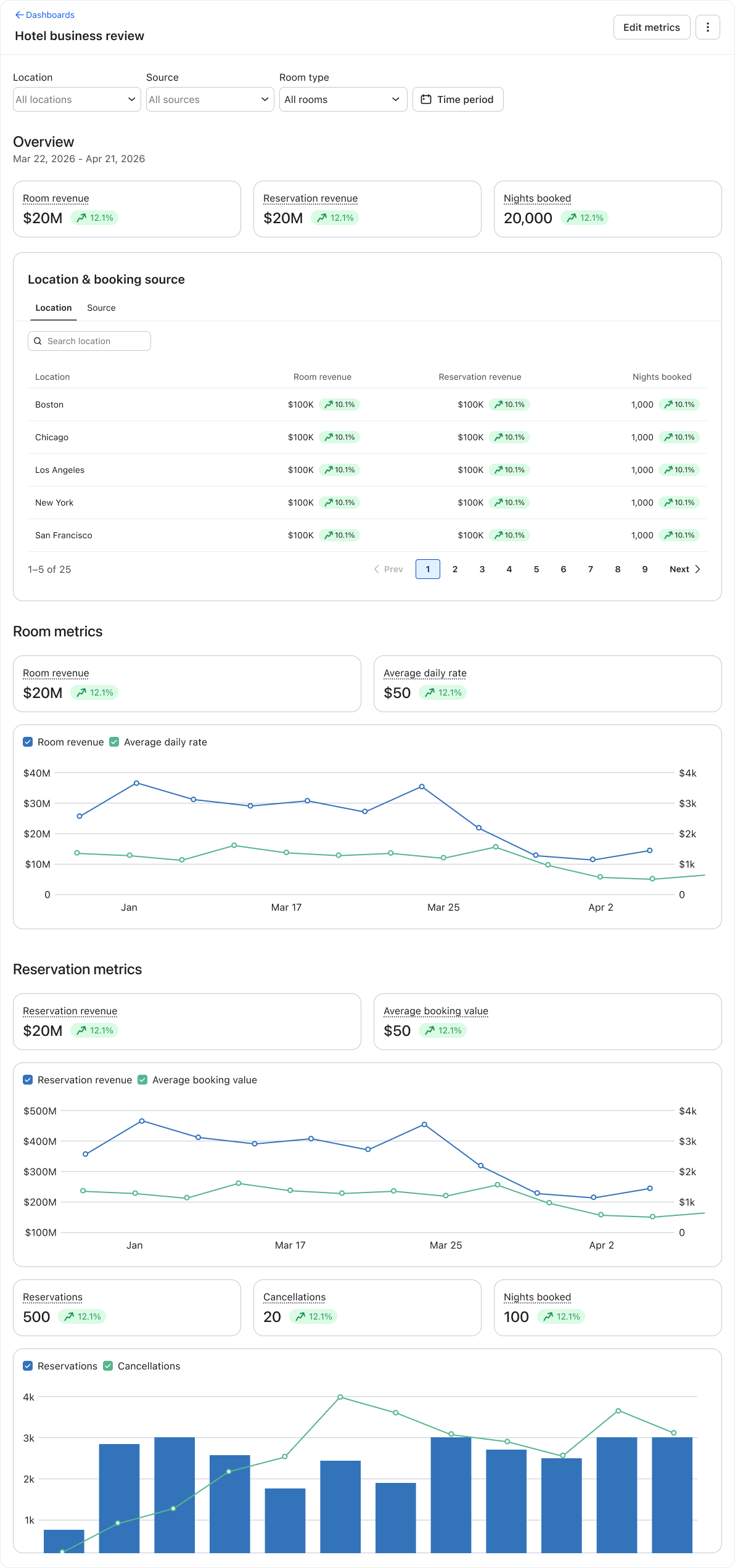
Use the Hotel Business Review dashboard to connect your marketing activity to hotel revenue and booking performance. It brings together room revenue, reservation revenue, ADR, booking value, reservations, cancellations, and nights booked when available, so you can see what is driving results and where to optimize.
Where to find it
In Klaviyo, head to the main navigation menu. Click Analytics, and then click Dashboards. Then, click on the Hotel business review dashboard from the list.
What to review
- Overview: Check whether your marketing is contributing to room revenue, reservation revenue, and nights booked.
- Room metrics: Compare room revenue and average daily rate over time to spot opportunities for upgrades, packages, or higher-value offers.
- Reservation metrics: Review booking value, reservation volume, and cancellations to understand where campaigns and flows may need improvement.
When to use it
Start here when you need to report on marketing impact or decide what to optimize next. Use the filters to compare time periods, properties, booking sources, or room types, then use what you learn to improve campaigns and flows.
Who has access
The dashboard is available once your account has a supported travel integration, including Mews, Cloudbeds, or Guesty. Users also need permission to view reporting dashboards. The metrics and sections shown depend on the integration that provides your data.
Description
With the Mews integration, you can set up 3 different dashboards using the Confirmed Room Night and Completed Room Night metrics. Use Mews-specific dashboards when you need a deeper view of how marketing activity affects room revenue and booking value. The three dashboards help you compare realized revenue and booking-time ADR across properties, booking origins, and resource types:
- Historical Daily Room Revenue from Stays: See how much room revenue was generated for each night of a completed stay.
- Average Daily Rate (ADR) from Stays: Compare the average nightly rate for completed stays.
- Average Daily Rate (ADR) from New Bookings: See the average nightly rate when a booking is confirmed, helping you evaluate the impact of campaigns and flows on booking value.
How to create them
In Klaviyo, head to the main navigation menu. Click Analytics, and then click Dashboards. Click Create Dashboard > Create. Then, follow the instructions written out in our guide for each dashboard:
What to review
Review each dashboard by property, booking origin, or resource type to spot which properties, channels, and room categories are associated with higher-value bookings.
When to use it
Use Historical Daily Room Revenue from Stays to understand the revenue your marketing helped generate. Use ADR from Stays to evaluate historical rate performance, and ADR from New Bookings to see whether campaigns and flows are influencing higher-value reservations.
Who has access
Your Mews integration must be connected to Klaviyo, and you need Editor-level access to create these dashboards.
Description
With the Cloudbeds integration, you can set up 3 different dashboards using the Confirmed Room Night and Completed Room Night metrics. Use Cloudbeds-specific dashboards when you need a deeper view of how marketing activity affects room revenue and booking value. The three dashboards help you compare realized revenue and booking-time ADR across properties, booking sources, and room types:
- Historical Daily Room Revenue from Stays: Measures room revenue attributable to each night of a completed stay.
- ADR from Stays: Shows the average nightly rate for completed stays.
- ADR from New Bookings: Shows the average nightly rate when a new booking is confirmed, helping you understand the impact of marketing on booking value.
How to create them
In Klaviyo, head to the main navigation menu. Click Analytics, and then click Dashboards. Click Create Dashboard > Create. Then, follow the instructions written out in our guide for each dashboard:
What to review
Review each dashboard by property, booking source, or room type to spot which properties, channels, and room categories are associated with higher-value bookings.
When to use it
Use Historical Daily Room Revenue from Stays to understand the revenue your marketing helped generate. Use ADR from Stays to evaluate historical rate performance, and ADR from New Bookings to see whether campaigns and flows are influencing higher-value reservations.
Who has access
Your Cloudbeds integration must be connected to Klaviyo, and you need Editor-level access to create these dashboards.
Navigate the Hotel business review dashboard
In the gallery tabs above, we learned about a number of different dashboards available to you, depending on which PMS integrations you might use. As long as you’ve integrated a PMS system, regardless of which specific one your team uses, you’ll gain access to the Hotel business review dashboard.
The image below shows you what you see upon clicking into the dashboard. Click on the plus signs throughout the image to learn more about some key information you have access to, and why it’s important.
Key metrics to focus on
Use these metrics to decide where your marketing strategy can improve. Start with 1 opportunity, make a focused change, and measure the result.
Average daily rate
Use average daily rate to understand what guests are willing to pay and which room types or offers drive premium value. Identify guests who are more likely to book premium rooms or packages, then use pre-arrival and post-stay messaging to promote relevant upgrades and higher-value experiences.
Revenue per available room
Use revenue per available room to spot gaps in demand generation and booking conversion. Strengthen abandoned checkout and browse abandonment flows, then use sign-up forms and a welcome series to build an audience you can nurture over time.
Reservations
Track reservation volume and trends by property, booking source, and room type when those breakdowns are available. Focus on sign-up forms, your welcome series, booking recovery, and browse abandonment to capture more demand.
Average booking value
Use average booking value to understand whether your campaigns are driving higher-value stays. Build pre-arrival flows and personalized campaigns that promote room upgrades, late checkout, premium packages, and local or on-property experiences.
Cancellations
Monitor cancellations to find opportunities to improve rebooking and understand why guests are dropping off. Set up a reservation cancellation flow that captures the reason, then use soft winback or rebooking messages when appropriate.
Direct booking performance
Compare direct booking performance with OTA activity to see where you can shift future demand. Build an OTA-booker segment for direct-booking incentives, strengthen your forms and welcome series, and exclude current and future guests from promotions that do not apply to them.